How to Change Your App Store Region 2026 — R-VPN
Did you know that the list of available apps in the App Store directly depends on the region set in your Apple ID? Sometimes the most needed programs — for example, TikTok, VPN clients, or messengers — simply don't show up in the store due to regional restrictions. Fortunately, you can get around these blocks by simply changing the country in your account settings or by creating a new Apple ID with a different region. Below we'll explain how to do this and what to keep in mind.
Why might apps be unavailable in your region?
Different countries restrict access to apps for different reasons — from national security to cultural norms. Here are some examples:
- TikTok — banned in India, restricted in some Middle Eastern countries, and under threat of being blocked in the US. The reason — security and data protection concerns.
- WhatsApp — blocked in the UAE and Iran due to message encryption policies and communication control requirements.
- Adult programs — such as Pornhub, XVideos, and others are blocked in India, Pakistan, the UAE, Russia, and partly in the US.
- VPN apps — have been disappearing from Apple stores in China, Russia, and India at the authorities' request since 2017.
But none of this is a reason to give up the services you need. The solution — is to change your App Store region and gain free access to all features.
How to change your App Store region?
There are two ways:
1. Change the region of your existing account
(Works if you have no active subscriptions and no balance)
2. Create a new Apple ID with a different region
(If you have active subscriptions or funds on your balance)
Changing the region of an existing account
Before you start:
- Make sure you have no remaining balance on your Apple ID.
- Cancel all active subscriptions to avoid automatic charges.
How to check your balance:
1. Open the App Store.
2. Tap your Apple ID at the top.
3. Check whether there are funds on your account.
4. If there are — spend them or contact Apple support.
.png/unnamed%20(8)__327x320.png)
Tip: if you're signed in on several devices under one Apple ID, it's enough to check the balance on one of them.
How to cancel subscriptions:
1. Open «Settings».
2. Tap your Apple ID.
3. Select «Subscriptions».
4. Cancel any active subscriptions.
How to change the region:
1. Go to the App Store and tap your Apple ID.
2. Tap your account again.
.png/unnamed%20(7)__148x320.png)
3. Select «Country/Region» and choose a new region where the apps are available for download.
.png/unnamed%20(6)__320x320.png)
4. Accept the terms.
.png/unnamed%20(5)__156x320.png)
5. Enter payment information. For free apps, you can select «None».
.png/unnamed%20(4)__156x320.png)
6. Enter any valid address in the chosen country (for example, the nearest Starbucks).
7. Tap «Next».
Done! The region is changed, and now you can download any apps that were previously unavailable, including TikTok, Instagram, and others.
Creating a new Apple ID with a different region
If you don't want to lose access to active subscriptions, create a new account.
How to create a new Apple ID:
1. Go to the website https://appleid.apple.com/account
2. Enter your name, country (one where the needed apps are available), date of birth, a new email, and phone number.
.png/unnamed%20(3)__469x320.png)
3. Come up with a strong password.
4. Tap «Continue».
How to connect the new account to the App Store:
1. Go to «Settings».
2. Tap your Apple ID.
.png/unnamed%20(2)__148x320.png)
3. Go to «Media & Purchases» → «Sign Out».
.png/unnamed%20(1)__451x320.png)
4. Tap «Media & Purchases» again → then select «Not your_name?»
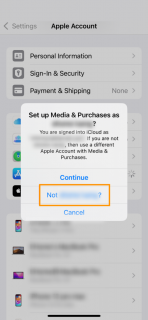
5. Enter the new account's details.
Now you can use one Apple ID for your main use and the second — only for downloading the apps you need from another region.
What to keep in mind
-
Some paid features may be unavailable without local payment information.
- Some apps may not work correctly outside the target region — a VPN can help with this.
- To update apps from another ID, you'll need to sign back into the relevant account from time to time.
How to manage multiple Apple IDs
- Separate accounts by purpose: one — local, the other — «international».
- Don't forget to switch accounts to perform updates.
- Use a password manager for convenience and security.
If you want to download apps that aren't available in your region — the solution is already in your hands. Changing your region or adding an account opens access to TikTok, VPNs, messengers, and everything you need. The main thing — is to understand how the system works and use it wisely.
Discuss: go to the R-VPN forum